Hi
This can be very handy when trying to troubleshoot.
Firstly you need to have the Telnet Client installed on your server.
Cant remember if this is under Roles or features but it is there.(Win 2008 R2)
After you added this open you command prompt, probably best to do it in admin mode.
Then you type the following:
Telnet 10.10.10.10 25 (So basically that is pointing to the ip on port 25. Change accordingly.)
Helo local.domain.com
Mail From: mail@domain.com
RCPT TO: mail@domain.com
To start with the body of your mail type
DATA
If you want a Subject:
Subject:-*Type Subject* Press Enter Twice
*Now type your Email*
Once your email body is done type a "." in it's own line
Now you should get a message saying that your mail was send...
If there was issues you should have received a error by now. Hopefully that error is useful.
Update: Much easyer to do this via PowerShell These days...:
http://daniecsp.blogspot.com/2015/02/test-and-troubleshoot-mail-with.html
Friday, 14 June 2013

Wednesday, 12 June 2013
SP2010: Move a site to a different Sub-Site
Here is how to move a site to a different Sub-Site in the same Site-Collection
You can do it in three ways:
Under Site setting use the Content and Structure option
Import/Export
Backup/Restore
i Am going to use the Content and Structure Option.
So go to the Site Settings of the root site collection and select Content and Structure.

Under Content and Structure select the parent site in the left column and check the site you want to move in the right-hand side. Then under actions click in Move.
If you don't have the move option you probably don't have admin rights.
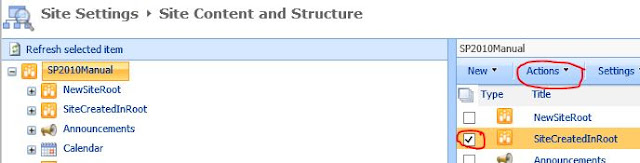
After this the Move web part will pop up, select the new destination and click ok

And that is it...Quick and easy

You can do it in three ways:
Under Site setting use the Content and Structure option
Import/Export
Backup/Restore
i Am going to use the Content and Structure Option.
So go to the Site Settings of the root site collection and select Content and Structure.

Under Content and Structure select the parent site in the left column and check the site you want to move in the right-hand side. Then under actions click in Move.
If you don't have the move option you probably don't have admin rights.

After this the Move web part will pop up, select the new destination and click ok

And that is it...Quick and easy

Tuesday, 11 June 2013
SharePoint CU Updates, should i install them?
This looks like quite a controversial issue?
i Saw a best practice from Microsoft in 2008 where they say only install it if it fixes a issue you are experiencing.
That seems to have change over the years...Some people say install them and some say don't...
i Am still in the process of reading up and doing some research but post your comments if you have some!
Ok, the approach im going to take is not to install the CU updates.
If it will resolve a specific issue then it can be tested on Dev and QA.
However, you will need to install SP2010 SP1. There was issues with SP1 and for this reason i will install either June 2011 CU but then in that case why not go for a newer SP...December 2012 CU was recommended and think i will go for that...
i Saw a best practice from Microsoft in 2008 where they say only install it if it fixes a issue you are experiencing.
That seems to have change over the years...Some people say install them and some say don't...
i Am still in the process of reading up and doing some research but post your comments if you have some!
Ok, the approach im going to take is not to install the CU updates.
If it will resolve a specific issue then it can be tested on Dev and QA.
However, you will need to install SP2010 SP1. There was issues with SP1 and for this reason i will install either June 2011 CU but then in that case why not go for a newer SP...December 2012 CU was recommended and think i will go for that...
Wednesday, 5 June 2013
SP2010: Users SP Favorites missing from my computer when trying to access "Add to SharePoint Sites" from home
Hi,
i Have a user which has got quote a few sites which they added via "Add to SharePoint Sites"
The site would be working perfectly internally, then they go home and then the only item available(VPN'ed and not VPN'ed) would be "Member Sites" and all the other items they added would be missing.
Then from home she gets this whether she is VPN'ed in or not
Going back to the office the still only see the "Member Sites" for apparently a few days then the links return...
Ok, so where to start.
i Found these two sites which were very helpful:
http://thechriskent.com/2012/03/02/fixing-sharepoint-office-integration-problems/
http://www.experts-exchange.com/OS/Microsoft_Operating_Systems/Server/MS-SharePoint/Q_27796793.html
What it comes down to:
Add a registry entry:
i Have a user which has got quote a few sites which they added via "Add to SharePoint Sites"
The site would be working perfectly internally, then they go home and then the only item available(VPN'ed and not VPN'ed) would be "Member Sites" and all the other items they added would be missing.
 |
| At Office |
Then from home she gets this whether she is VPN'ed in or not
 |
| At Home |
Ok, so where to start.
i Found these two sites which were very helpful:
http://thechriskent.com/2012/03/02/fixing-sharepoint-office-integration-problems/
http://www.experts-exchange.com/OS/Microsoft_Operating_Systems/Server/MS-SharePoint/Q_27796793.html
What it comes down to:
Add a registry entry:
HKEY_LOCAL_MACHINE\SYSTEM\CurrentControlSet\Services\WebClient\Parameters
Create a new multi string value called "AuthForwardServerList"
Add the following value:
http:\\*.domain.com
i Have seen some people adding this entry under
HKEY_LOCAL_MACHINE \SYSTEM\CurrentControlSet\WebClient\Parameters
You can also try this if top path does not work
This will take up to 24 hours to take affect as office only request the list of sites every 24hours.
SharePoint and SQL Server 2008 R2 maintenance plans and maintenance
Hi,
Here is how a run my SQL Server maintenance plans and do maintenance.
i Have updated this post a few time's as i read some new onions...
i Set it for once a week...
i Choose the following tasks:
Update: SharePoint checks the index, it calls the stored procedure "proc_DefragmentIndices" so you can leave that step if that storeproc is under the DB, else you need to run a rebuild index.
Also important to regularly check the DB integrity
Remember to not run A/V scans on your SQL server files.
Set your "Default index fill factor" to 80(Under DB Settings)

Then a change the order, have seen people do the backups last but a want a backup before anything gets corrupted.
If you have any comment on the tasks please post a comment, this is the way i do it...Probably a few opinions on this.

On the next page choose you backup location and set the other settings
Same for Transaction log backups page.
On Backup integrity there is not much to set but choose your db's
On index rebuild again choose your db's and select "Change free space per percentage to:" 80%

Update stats again choose your db's
Clean up history and the clean up tasks is handy to help you not letting you backups filling up your drives.
Dont include a Shrink in your maint plan.
It is also debatable if you want to include rebuild index and update statistics as SharePoint has got a timer job for this.
i Am sticking to Index rebuild...Looks like there are ways to check how much it is fragmented and then decide if rebuild or re-index. i Still think rebuild cant hurt so that is why im sticking to it but that is my 2cents
Then to shrink your log files:
Go to the database with a big log file, properties and options. There you will find the Recovery Model. Set this to simple.

Right click on your DB again, Tasks, Shrink and Files

Here you can change the File Type to Log and click ok.
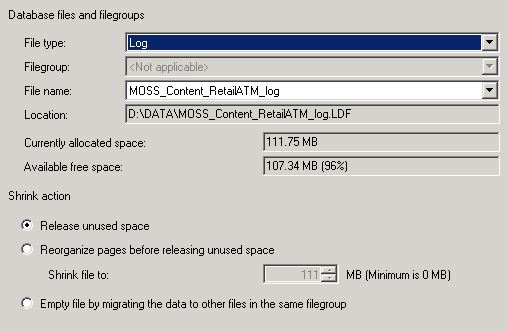
After this i run "DBCC CHECKDB" just to make sure all is still healthy.
Also look at the Microsoft Whitepaper on SharePoint SQL Maintenance.
http://technet.microsoft.com/en-us/library/cc262731.aspx
Very helpfull! and some more details in there which i will probably add as i read it more in detail
Here is how a run my SQL Server maintenance plans and do maintenance.
i Have updated this post a few time's as i read some new onions...
i Set it for once a week...
i Choose the following tasks:
Update: SharePoint checks the index, it calls the stored procedure "proc_DefragmentIndices" so you can leave that step if that storeproc is under the DB, else you need to run a rebuild index.
Also important to regularly check the DB integrity
Remember to not run A/V scans on your SQL server files.
Set your "Default index fill factor" to 80(Under DB Settings)

Then a change the order, have seen people do the backups last but a want a backup before anything gets corrupted.
If you have any comment on the tasks please post a comment, this is the way i do it...Probably a few opinions on this.

On the next page choose you backup location and set the other settings
Same for Transaction log backups page.
On Backup integrity there is not much to set but choose your db's
On index rebuild again choose your db's and select "Change free space per percentage to:" 80%

Update stats again choose your db's
Clean up history and the clean up tasks is handy to help you not letting you backups filling up your drives.
Dont include a Shrink in your maint plan.
It is also debatable if you want to include rebuild index and update statistics as SharePoint has got a timer job for this.
i Am sticking to Index rebuild...Looks like there are ways to check how much it is fragmented and then decide if rebuild or re-index. i Still think rebuild cant hurt so that is why im sticking to it but that is my 2cents
Then to shrink your log files:
Go to the database with a big log file, properties and options. There you will find the Recovery Model. Set this to simple.

Right click on your DB again, Tasks, Shrink and Files

Here you can change the File Type to Log and click ok.
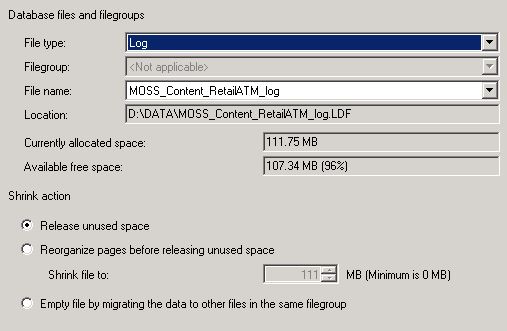
After this i run "DBCC CHECKDB" just to make sure all is still healthy.
Also look at the Microsoft Whitepaper on SharePoint SQL Maintenance.
http://technet.microsoft.com/en-us/library/cc262731.aspx
Very helpfull! and some more details in there which i will probably add as i read it more in detail
SP2010: “Check out” functionality doesn’t allow user to check out MV2, mcr and raw files
i Have a user with the following issue:
“Check out” functionality doesn't allow user to check out MV2, mcr and raw file types to his local drafts folder.
The pop up window to allow him to check out documents to his drafts folder but checkout doesn't come up after clicking on check out. It just checks out the file.
The procedure to resolve this is similar to adding a PDF iFilter and the part that actually brings up the Save to local drafts is the part where you edit the docicon.xml file

http://daniecsp.blogspot.com/2012/11/sp2010-installing-pdf-ifilter-and.html
As above, look for a icon for the file, upload it to the images folder and add a line in the docicon.xml for that extension.
Important:
You also need to have the file type associated with a application on your local machine.
If you click on the file and it ask you what you want to open the file with it is not associated with a application and it wont give you the option to save to drafts.
“Check out” functionality doesn't allow user to check out MV2, mcr and raw file types to his local drafts folder.
The pop up window to allow him to check out documents to his drafts folder but checkout doesn't come up after clicking on check out. It just checks out the file.
The procedure to resolve this is similar to adding a PDF iFilter and the part that actually brings up the Save to local drafts is the part where you edit the docicon.xml file

http://daniecsp.blogspot.com/2012/11/sp2010-installing-pdf-ifilter-and.html
As above, look for a icon for the file, upload it to the images folder and add a line in the docicon.xml for that extension.
Icon Path: \Program Files\Common Files\Microsoft Shared\Web Server Extensions\14\TEMPLATE\IMAGES\
DocIconPath: "C:\Program Files\Common
Files\Microsoft Shared\Web Server Extensions\14\TEMPLATE\XML." and edit
the docicon.xml file
Important:
You also need to have the file type associated with a application on your local machine.
If you click on the file and it ask you what you want to open the file with it is not associated with a application and it wont give you the option to save to drafts.
Monday, 3 June 2013
SP2010: Enable health reports on a SharePoint 2010 server
Hi,
Here is how to enable the health reports for SharePoint 2010.
You might get this message when clicking on it under Central Admin monitoring:
a health report is not available for this site. usage processing may be disabled on this server
On Central Admin goto "Manage Services on Server"
Make sure that the following to are started:
"Web Analytics Data Processing Service"
"Web Analytics Web Service"
Then goto Monitoring and Review Job Definitions
You need to change the Service to "Microsoft SharePoint Foundation Usage" and enable it.
Once enabled run it.
Check the report again
Here is how to enable the health reports for SharePoint 2010.
You might get this message when clicking on it under Central Admin monitoring:
a health report is not available for this site. usage processing may be disabled on this server
On Central Admin goto "Manage Services on Server"
Make sure that the following to are started:
"Web Analytics Data Processing Service"
"Web Analytics Web Service"
Then goto Monitoring and Review Job Definitions
You need to change the Service to "Microsoft SharePoint Foundation Usage" and enable it.
Once enabled run it.
Check the report again
Subscribe to:
Posts (Atom)